Route Planner, Delivery, MyWay
- 4.8
- Rating
- 50.00K
- Installs
- Free
- Price

 Analysis by App-foxy
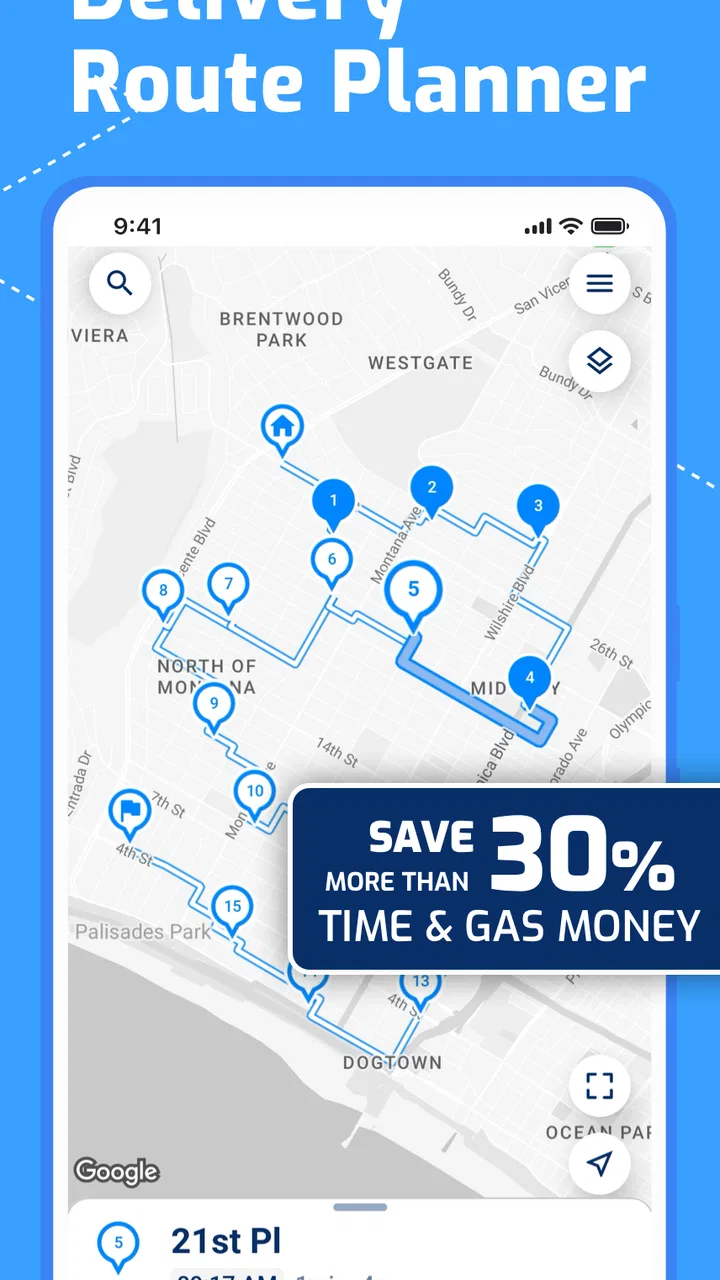
Planning several deliveries is one of those jobs that looks simple until the stops begin to multiply. A route that feels obvious on a map can become expensive once you add traffic, backtracking, missed turns, and the time spent rebuilding the order by hand. Route Planner, Delivery, MyWay is designed for that specific problem: it helps organize delivery stops into an efficient circuit rather than leaving you to arrange them manually. After using it as a practical navigation tool, I see it as a focused option for drivers, small businesses, and anyone who makes repeated drop-offs in a day.
The app comes from Proalab Limited and sits in the Maps & Navigation category. It is free to start, available to Everyone, and supports Android devices running version 8.0 or later. Its current version is 1.4.19. The basic appeal is easy to understand, but the real question is whether it remains useful when a route becomes busy, changes during the day, or has to be rebuilt after something goes wrong.
How Route Planner, Delivery, MyWay feels in everyday work
Route Planner, Delivery, MyWay is most useful when the destination is not a single address but a sequence of addresses. That distinction matters. A normal map application is excellent at taking me from where I am to one place, then letting me search for the next. This app is aimed at the planning stage before and during a delivery run, where the order of stops affects the whole journey.
You May Also Like

 Blood Strike: 2.5 Anniversary
Blood Strike’s Loadouts Turn Every Drop Into a Tactical Gamble
A close look at Blood Strike’s custom loadouts: how fast access to signature weapons reshapes its battle royale rhythm, rewards preparation, and narrows the gap between fights.

 Pandora - Music & Podcasts
Pandora’s Music Is Easy to Start, but Harder to Recover
Pandora’s strength is its low-effort path from a seed to a station. Its weak spot is how much confidence it asks you to place in connection, setup, and quiet recovery.

 8 Ball Pool
 Is Built on Rivalries, Rematches, and Routine
A close look at the rivalries, rematches, shared routines, and unanswered safety questions that turn a quick pool match into a persistent mobile community.

 Samsung Music
’s Quiet Strength Is Playing What You Already Own
Its reach comes less from spectacle than from dependable access to a personal library. That simplicity is both the app’s strongest retention engine and its ceiling.

 AccuWeather: Weather Radar
AccuWeather Review: A Quick, Clear Forecast for Everyday Decisions
For everyday plans, the best forecast is the one you can understand quickly. AccuWeather makes rain timing, radar, and local conditions easy to act on, with a few trade-offs.

 Hill Climb Racing
Why Hill Climb Racing Still Turns Crashes Into One More Run
A tiny car, a bumpy hill and one more upgrade: Hill Climb Racing keeps resurfacing because its simple chaos makes every near-miss feel personal.
More From Our News Desk
View All News


I would not treat it as a replacement for every navigation app. Instead, I see it as the layer that helps decide the shape of the day. Once the stops are organized, a familiar navigation service may still be the better companion for turn-by-turn driving, live traffic context, or other everyday map needs. The strength here is the route sequence itself: putting several deliveries into a sensible loop can remove the mental work that usually falls on the driver.
That makes the app particularly suitable for local couriers, independent sellers, florists, repair services, food businesses, and anyone who regularly visits customers in the same general area. It can also help with non-commercial errands. If I need to visit a pharmacy, hardware store, parcel point, and customer address, the same planning idea applies. The benefit is not limited to professional vans; it is about reducing unnecessary movement between multiple destinations.
What I expect before starting a route
The first practical advantage is having a route plan before setting off. Without one, it is easy to accept the first suggested order, then discover that the next stop sends the vehicle across an area already passed earlier. A circuit-based approach encourages me to think about the whole run instead of treating every address as an isolated trip.
That change in mindset is more valuable than it sounds. The app is not merely a place to look at pins. It gives a delivery run a structure. I can review whether the stops form a sensible progression, identify an awkward outlier, and decide whether that stop should be handled separately. This is the kind of preparation that can save fuel and attention even when the route itself is not especially long.
My advice is to build the route while stationary, not while pulling away from a curb or waiting at a red light. A route planner is most helpful when I use it as a preparation tool. Entering addresses in a hurry increases the chance of choosing the wrong location or overlooking a stop, and no optimization can fully compensate for poor input.
Speed: where the app should feel quick
For this type of app, perceived speed is less about flashy animation and more about how quickly I can move from a list of destinations to a usable plan. The important moments are adding stops, reviewing the proposed order, and making corrections. If those steps feel direct, the app earns its place in a delivery workflow. If every small change requires too much tapping, the time saved on the road can be lost before departure.
My experience with a focused route planner is that the biggest speed improvement comes from reducing decisions, not from rushing the interface. I want to see a clear relationship between my destinations and the resulting circuit. When the route is sensible, I can spend less time comparing alternatives in a general map app. That is a practical kind of speed: fewer manual calculations and less switching between screens.
There is also a difference between a short route and a demanding one. With only a handful of stops, almost any reasonable planner may feel fast enough. The value becomes clearer when the list grows or when the addresses are spread across several neighborhoods. In those situations, manually testing different sequences becomes tedious, while an automated plan can provide a useful starting point much sooner.
I would still leave a little preparation time before a fixed delivery window. Route planning is not the same as guaranteeing a travel time. Traffic, loading delays, parking, building access, and customer availability can all change the real schedule. The app can help me arrange the geography, but it cannot remove the human delays that happen at each stop.
Heavy-use moments and the cost of changing plans
The most revealing test is not a quiet route with three familiar addresses. It is the busy run: several deliveries, one customer who changes the location, a stop that must be postponed, and a new address added after the vehicle has already left. This is where a route planner either becomes a dependable assistant or turns into another source of friction.
For heavy use, I would divide the work into two stages. First, create the main circuit with every known stop. Second, handle changes deliberately rather than repeatedly rebuilding the entire plan for minor adjustments. That approach keeps the original route as a reference and makes it easier to judge whether a new stop genuinely belongs in the current run.
A useful habit is to mark the route mentally by zones. Even if the app produces the sequence, I can recognize that several destinations sit in the same neighborhood and avoid casually accepting a change that sends me away from the current area. This is one of the less obvious benefits of using a planner: it gives me a visual and practical overview, but I still need to apply local knowledge.
Another trade-off appears when delivery priorities matter more than distance. The shortest circuit may not be the best business route if one customer has a narrow availability window or if a refrigerated item should be delivered earlier. An efficient route is a recommendation, not a command. I would review the order against promised times, vehicle needs, and stop-specific constraints before starting.
When a route is rebuilt during a busy day, I prefer to stop safely and save the current state of the work before making major edits. That simple workflow protects against confusion. If I change several destinations at once while distracted, it becomes harder to remember which addresses have already been completed and which are still pending.
Reliability and recovery when the day goes off plan
Reliability in a delivery planner means more than opening successfully. I want the route to remain understandable after interruptions: a phone call, a missed entrance, a customer who is unavailable, or a temporary loss of concentration. The best plan is one I can return to without having to reconstruct the entire day from memory.
My practical recommendation is to treat the app as a route organizer and keep a simple completion habit. After each delivery, I would confirm the stop in whatever way the app makes available and then take a moment to check the next destination before moving. That rhythm is safer than racing through a long list and trying to remember several completed addresses at once.
Recovery is especially important for drivers who work in unfamiliar areas. If I miss a turn or decide to skip a stop temporarily, I need to know whether the remaining sequence still makes sense. A route planner can give me a strong starting order, but real roads are not static diagrams. Roadworks, parking restrictions, access gates, and one-way streets may force a local detour. I would rather make a controlled adjustment than blindly follow an order that no longer fits the situation.
The app’s high average rating of 4.8 from around 1.3 thousand ratings suggests that many users find its core purpose convincing. I would interpret that as encouragement rather than proof that every route will be perfect. Ratings often reflect whether an app solves its main problem, while individual working conditions determine how well it fits a particular driver.
With over 50 thousand installs, it also has a meaningful user base for a specialized delivery tool. That makes it easier for me to take the app seriously than an obscure planner with no visible adoption. Still, reliability should be judged by repeated use: whether address entry stays manageable, whether route changes remain clear, and whether the workflow matches the pressure of a real delivery day.
Device limits, battery habits, and practical constraints
The Android requirement is relatively accessible because the app runs on Android 8.0 and later. That matters for small operators who may use an older work phone instead of buying a new device solely for route planning. A compatible operating system does not guarantee identical performance across all phones, however. A newer device with more available storage and memory will generally feel more comfortable when other apps are active.
Resource demands are most relevant when the planner is used alongside navigation, calls, messaging, and delivery records. I would avoid starting a route with a nearly full battery, especially if the phone will remain mounted and the screen will be used repeatedly. The app itself may be lightweight enough for ordinary planning, but the complete driving setup can still consume power quickly because several services are working at once.
There is also a screen-size consideration. A compact phone can be perfectly adequate for entering a few addresses, yet a larger display makes a multi-stop route easier to inspect. When destinations are close together, a small screen may require more zooming and scrolling. That is not a flaw unique to this app, but it affects how confidently I can review a circuit before leaving.
I would also keep the device’s location and connectivity situation in mind. A route planner is most useful when the phone can receive the information needed to build and follow the plan. In a weak-signal area, I would prepare earlier and avoid assuming that every last-minute change will be as convenient as it is in a strong coverage zone. Good route planning includes a little redundancy: the essential addresses should remain available in a form I can consult if the phone becomes inconvenient.
For older or budget devices, the sensible test is simple. Install the app, create a representative route with the number of stops normally handled, and see whether switching between the planner and the preferred navigation tool feels comfortable. A short trial on the actual work phone is more useful than judging performance from a newer personal handset.
How it compares with ordinary map apps and manual planning
A standard map app usually wins when I need live navigation, a quick search for a business, or directions to one destination. It is familiar and flexible, and many people already use one every day. The weakness appears when I have a long list of stops and need the best overall order. Entering each address one by one can work, but it leaves me responsible for spotting unnecessary backtracking.
Manual planning on paper or in a notes app has its place. It is cheap, visible, and easy to adapt when priorities change. For a very small route in a familiar neighborhood, I might not need anything more. The problem is that manual ordering becomes tiring as the number of destinations grows, and a mistake near the beginning can affect every later stop.
This app occupies the middle ground. It is more specialized than a normal map and more structured than a handwritten list. I would choose it when the route itself is the problem, not merely the individual directions. I would choose a general map first when traffic conditions, public transport, walking, or exploration are the main concern.
There is a further business consideration. The app is free to download, but in-app purchases range from around ten dollars to around eighty dollars per item. That broad range means I would inspect the available purchase options carefully before building the app into a company-wide process. A casual user may be comfortable starting free, while a professional user should decide whether the paid features justify the cost for the number of routes handled.
Who will benefit most, and who should skip it
I think the strongest match is a person who repeatedly visits multiple addresses and wants help deciding the order. A solo courier can use it to prepare a morning circuit. A small service business can use it to reduce the time spent arranging appointments geographically. A seller making local drop-offs can use it to turn a loose list into a more deliberate run.
It is also a good fit for people who are comfortable checking a plan and making human decisions. The app can organize destinations, but I would not hand over responsibility for delivery priorities, customer promises, or road judgment. Users who expect a route planner to understand every business rule automatically may find the experience less satisfying.
I would skip it if I only need directions to one place at a time. In that situation, a familiar navigation app is likely simpler. I would also look elsewhere if my main need is public transit planning, walking directions, cycling guidance, or detailed live traffic analysis. Those are different problems from arranging a delivery circuit.
Likewise, businesses with complex dispatch operations may eventually need a broader logistics platform with team assignment, proof-of-delivery workflows, customer notifications, and centralized monitoring. This app is better understood as a focused route-planning tool than as a complete fleet management system.
A realistic delivery-day workflow
Imagine I have a morning run across several nearby districts. Before leaving, I enter every confirmed address and review the proposed circuit. I notice that one stop is outside the main cluster and another customer can only receive the order later. Instead of accepting the first sequence without thought, I move the time-sensitive delivery into the appropriate part of the run and decide whether the distant stop should be completed on the way back.
Once the route looks sensible, I begin driving and use my usual navigation method for the immediate directions. At each stop, I confirm what has been completed before moving on. If a customer is unavailable, I do not simply forget the address; I keep it visible as an unfinished task and revisit the route from a safe stopping place. If a new delivery appears nearby, I consider it against the current zone rather than automatically inserting it at the end.
This workflow shows where the app adds value. It reduces the planning burden while leaving room for judgment. It also shows why the app should not be treated as an autopilot. The efficient circuit is a foundation, and the driver still has to account for real-world timing, access, and customer communication.
My performance verdict
Route Planner, Delivery, MyWay is a sensible choice for Android users who need to arrange multiple delivery stops without manually calculating the entire sequence. I like its focused purpose, accessible operating-system requirement, and practical fit for small delivery runs. The strong rating and growing install base reinforce the impression that its central idea is useful to many people.
My recommendation comes with boundaries. Test it on the phone used for work, prepare routes before driving, and compare the planned order with delivery windows and local road knowledge. Keep a general navigation app available for detailed directions, and do not assume that the shortest circuit is always the best service route. The app can save effort, but only when the information entered is accurate and the route is reviewed intelligently.
For occasional single-stop trips, it is more planning than necessary. For repeated multi-stop work, however, it offers a clearer starting point than a basic map or a handwritten list. The real performance win is not dramatic speed; it is the reduction of repeated route decisions during a busy day. If that is the problem I need to solve, I would give this free Maps & Navigation app a serious trial, while keeping its purchase options and my own delivery requirements in view.
FAQs for Route Planner, Delivery, MyWay
01What is Route Planner, Delivery, MyWay used for?
Route Planner, Delivery, MyWay is designed to help delivery drivers, couriers, and field workers organize multiple stops into a more efficient route. After entering delivery addresses, the app can arrange them in a practical order and provide navigation support. It is especially useful for users who need to complete several deliveries or visits during the same workday.
02Can I add several delivery stops and optimize their order?
Yes, the app is primarily intended for multi-stop route planning. You can add the addresses or destinations you need to visit and use the planning tools to arrange them more efficiently. This may help reduce unnecessary driving and save time, although the final result can depend on traffic, road restrictions, delivery time windows, and the accuracy of the address information entered.
03Does Route Planner, Delivery, MyWay provide turn-by-turn navigation?
The app can support route guidance, but navigation features may work together with an installed mapping or GPS application on your device. Before starting a route, make sure location services are enabled and that the relevant map application is available. Users should also check the suggested route themselves, since traffic conditions, construction, private roads, and temporary closures can affect directions.
04Can I use the app without an internet connection?
Some route-planning functions may remain available after destinations have been entered, but complete offline use depends on the app version and the navigation service connected to it. Live traffic information, online address searches, map updates, and certain synchronization features generally require an internet connection. If you work in areas with weak coverage, prepare the route in advance and verify whether offline maps are supported.
05Is Route Planner, Delivery, MyWay free to download and are there any limitations?
The application may be available to download at no initial cost, but users should review the current store listing for advertisements, optional purchases, subscription plans, or feature restrictions. Limits can apply to the number of stops, saved routes, advanced optimization tools, or business features. Pricing and availability may also differ between Android and iOS, so checking the official download page before installing is recommended.
Pros
- Plans efficient multi-stop delivery routes
- Supports route optimization for multiple destinations
- Helps reduce travel time and fuel costs
- Useful for couriers
- drivers
- and delivery teams
- Clear navigation aids improve daily route management
Cons
- Some advanced tools may require a paid subscription
- Route accuracy depends on current map data
- Large delivery lists can take time to process
- May use significant battery during active navigation
- Limited offline functionality can be inconvenient

Route Planner, Delivery, MyWay
Gallery